Getting Started with OneNote
Session Objectives
Success Criteria
Standards
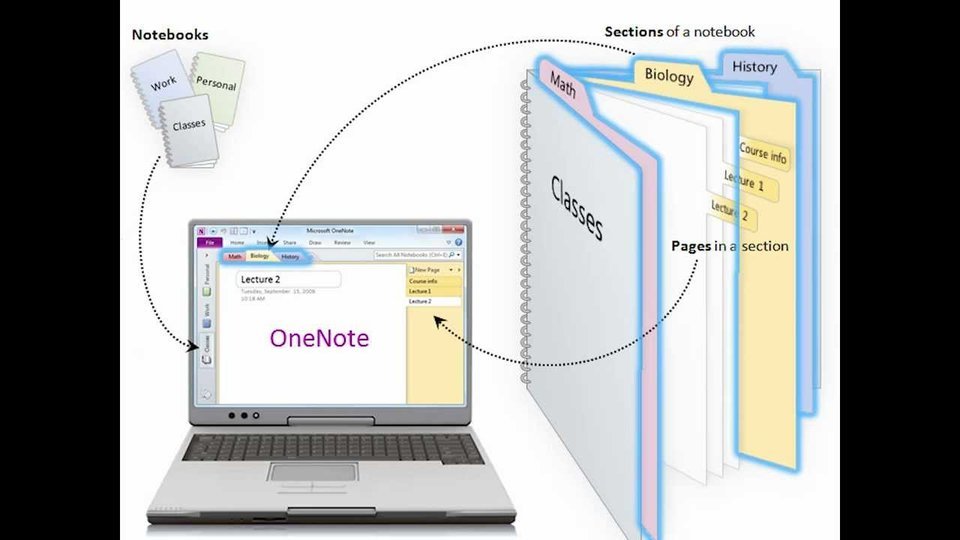
- Review examples of OneNote Notebooks (PLC Notebooks)
- Create a notebook for personal, PLC, or student use
- Explore options in OneNote: Home Ribbon, Insert Options, etc
- Work with sections and pages and add content to a page
- Review sharing options and share the notebook
- Review locating and finding the notebook
Success Criteria
- Participants can locate and access the notebook they created
- Participants can add sections, pages, and text to their notebook
Standards
Bellwork
Task 1
Create a new OneNote in OneDrive and add two sections and 2 pages in each section.
Tip: Remember to always create your notebook in OneDrive!
Task 2
Insert file attachment.
Task 3
Examine online vs installed OneNote.
Task 4
Locate and close your saved OneNote notebook.
Task 5
Share your notebook.
Wrap-up & Evaluate
1. How will you use OneNote in your classroom?
Post your comment HERE on this Padlet.
2. Additional Resources
OneNote for Teachers
Teaching & learning with a range of media using OneNote
1. How will you use OneNote in your classroom?
Post your comment HERE on this Padlet.
2. Additional Resources
OneNote for Teachers
Teaching & learning with a range of media using OneNote
